Need to restore an SQL Server database backup?
SQLBackupAndFTP will do this for you!
- Properly handles full, differential and transaction log backups
- Restores from SQL scripts and BACPAC containers
- Supports Zip and 7zip archives
-
Automatically downloads backups from FTP, Amazon S3, Dropbox, Google Drive,
OneDrive, Box, Backblaze B2 and Yandex Disk as well as from a local folder
- Restores several databases at once
- Provides you with a detailed log and backup history
- Does all this for FREE!
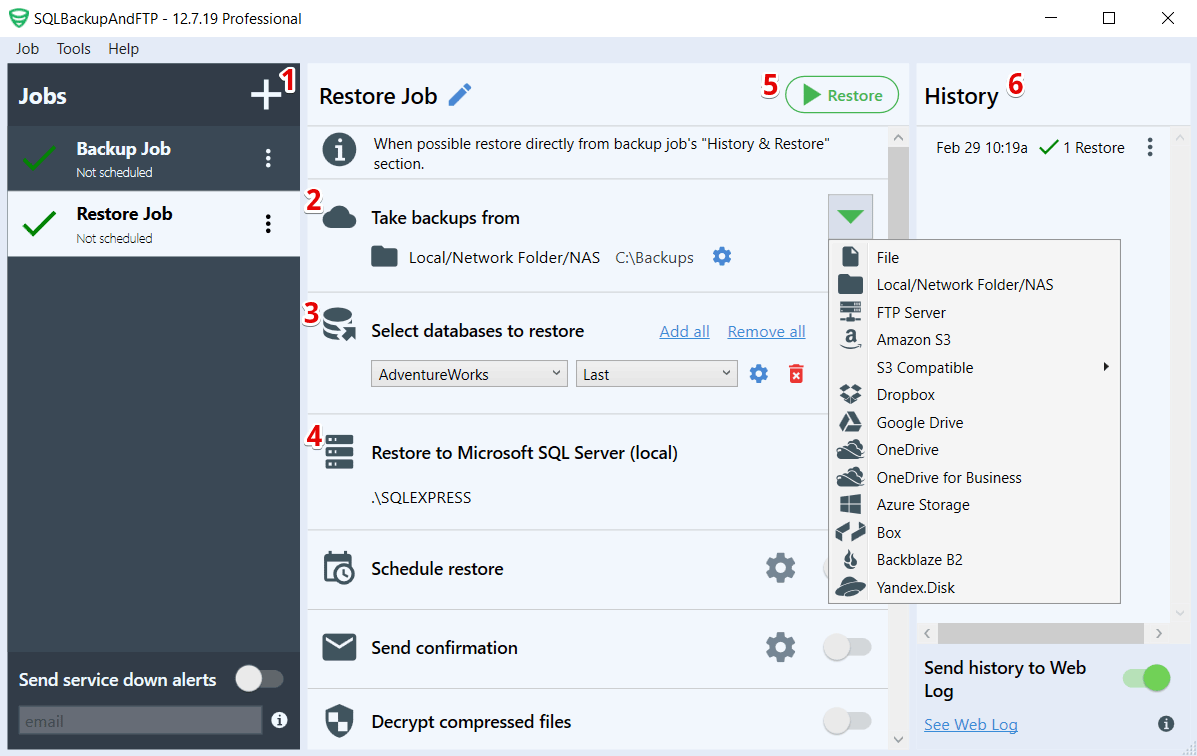
- Create a restore job
- Select the backup location (local or cloud)
- Select databases to restore
- Select the SQL Server you want to restore the backup to
- Run the restore
- Keep restore history
To get more information read How to Restore SQL Server Backups.
FAQ
What if I have full, differential and transaction log backups?
No problem, you can choose any of them as a recovery point and SQLBackupAndFTP will handle all of them
properly. First, the full backup will be recovered, then the last differential backup and then all
transaction log backups up to the selected recovery point.
Do you overwrite the files when restoring to another database?
When restoring a backup from database X to database Y, we use the "MOVE" option so Y files get overwritten.
Restore errors
The most common errors are "The media family on device .. is incorrectly formed," "RESTORE HEADERONLY is
terminating abnormally" and "The backup of the system database on device .. cannot be restored because it
was created by a different version of the server." These all occur when you try to restore to an older
SQL server. You cannot restore backups from a newer SQL version to an older one, because the formats of Microsoft
backup files are different.
Do you guarantee the safety of the data?
No (nobody would). Under no circumstances do we accept any responsibility for the use and performance of
this program. It is provided to you "AS IS" — use at your own risk
(see
Terms of Service). In general, database
backup and restore operations should only be handled by a person who knows what they are doing. It is
very easy to overwrite an existing database and lose the data. If in any doubt, don't do it yourself — find
a professional that can help.
What license is it under?
