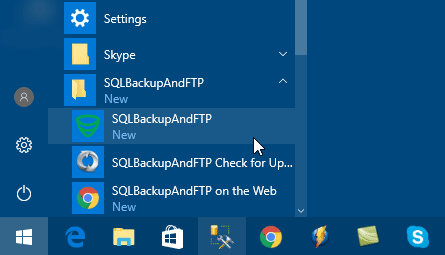
You can find the SQLBackupAndFTP shortcut in the Windows Start menu in the SQLBackupAndFTP folder.
Start SQLBackupAndFTP Click image to enlarge ↗
Before you start, install SQLBackupAndFTP on the Windows computer that will run your backup jobs.
Step 2 of 9
Connect to Database Server
The Connect to Server form will open automatically or by clicking the gear button.
Select the DBMS type from the Server type list and set the connection parameters for the selected DBMS type.
Click Test Connection to verify the connection. If the connection succeeded, click Save & Close.
Connect to Database Server Click image to enlarge ↗
Step 3 of 9
Select databases to backup
Click the gear button in the Select databases section and choose databases you want to backup by clicking checkboxes next to them in the list.
Or you can check Backup all non-system databases - this will automatically select all non-system databases.
This feature has an additional benefit - if new databases are created in the future, they will automatically be backed up. To exclude some databases from being automatically backed up add them to the Exclude databases list.
Select databases to backup Click image to enlarge ↗
Step 4 of 9
Select destinations to store backups
Choose a destination on this screen to store the backups.
Contabo and Internxt use the S3 Compatible - Custom setup. Use the endpoint and credentials supplied by your provider.
Select destinations to store backups Click image to enlarge ↗
Step 5 of 9
Set up notification e-mails
Turn on Send confirmation.
On success email to (optional): emails will be sent to these recipients when the job is successful.
On failure email to: emails will be sent to these recipients if any error is encountered during the backup job.
Click the gear button for Advanced email settings.
Set up notification e-mails Click image to enlarge ↗
Step 6 of 9
Run the job
Click Run Now.
Verify that the appropriate people have received email messages.
Verify the target destinations contain backup files for each database.
If possible, test restoring these databases.
Run the job Click image to enlarge ↗
Step 7 of 9
Schedule the backup job
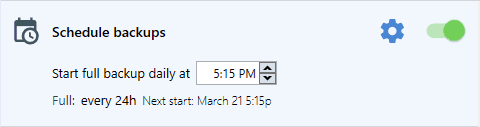
Turn on Schedule backups. Choose a time to do a full backup, usually during the night.
Click the gear button for Advanced schedule settings.
Schedule the backup job Click image to enlarge ↗
Step 8 of 9
Restore
All your backups can be found at the History & restore section. You can open a backup log by clicking Open Log, download backup file(s) by clicking Download Backup or restore the database from the backup by clicking Restore from Backup.
Restore Click image to enlarge ↗
Step 9 of 9
Web Log
Web log shows the read-only history of backup jobs from your computers. It is available for licenses with active Full-Service subscription.