Step 4 of 9
Send backups to Azure Storage
Choose your storage destination
 Local / NAS
 FTP
FTP
 Amazon S3
 S3-compatible storage
 Google Cloud Storage
 Wasabi
 Aruba Cloud
 Dropbox
 Google Drive
 OneDrive
 OneDrive for Business
 Azure Storage
 Box
Box
 Backblaze B2
Contabo and Internxt use the S3 Compatible - Custom setup. Use the endpoint and credentials supplied by your provider.
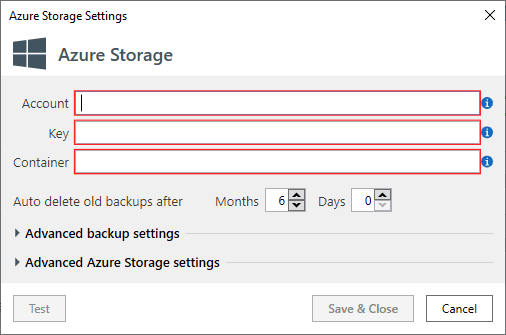
If you chose to send backups to Azure Storage - you will see this form.
On the Azure Storage Settings form you’ll need to specify how to connect to your Windows Azure Storage account. Account Name and Access Key can be found on the Storage page of your Windows Azure Portal. Here you should enter Container Name for your backups. SQLBackupAndFTP will create container if it does not exist.