Step 4 of 9
Send backups to a Local/Network Folder/NAS
Choose your storage destination
 Local / NAS
 FTP
FTP
 Amazon S3
 S3-compatible storage
 Google Cloud Storage
 Wasabi
 Aruba Cloud
 Dropbox
 Google Drive
 OneDrive
 OneDrive for Business
 Azure Storage
 Box
Box
 Backblaze B2
Contabo and Internxt use the S3 Compatible - Custom setup. Use the endpoint and credentials supplied by your provider.
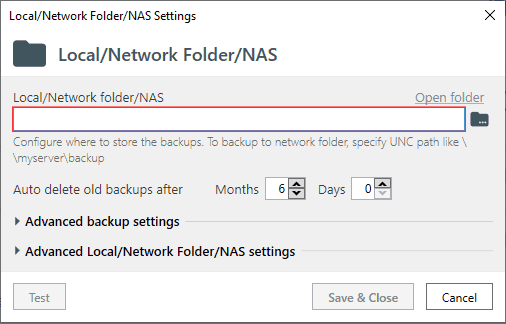
If you chose to send backups to a Local/Network Folder/NAS - you will see this form.
Specify a path to a folder you prefer to use for backup storing.
If it is a local folder then specify a path as D:\Backups. Or specify a path like \\backupserver\sqlbackups\ if the backups should be stored on a different server.
Note that the account which starts a scheduled job must have sufficient permissions to write to the target folder (In Advanced Local/Network Folder/NAS settings you can set it to run under your own account).